Introducing GREMLIN, My AI-Powered Assistant
A few weeks ago I started seeing stuff on the internet about OpenClaw (the renamed project that began life as ClawedBot). For those unaware, it’s essentially a framework that lets you leverage an LLM (whether you’re running it locally or have it hooked up to OpenAI, Claude, Gemini, etc.) and can act as a personal AI assistant. The difference between OpenClaw and, say, OpenAI or Claude on the web is you can define a persistent personality. It also has access to persistent memories (which are markdown files in a git repository), it can schedule ongoing tasks, and you can hook it up to a variety of messaging services.
Safety First!
Right away, OpenClaw provided plenty of power for people to get into trouble. Because most of the potential usefulness comes from giving OpenClaw access to your emails, files, a web browser, and communications, people who installed OpenClaw on their machines and provided full access discovered the harsh reality of prompt injection attacks. Emails sent to an OpenClaw connected account with white text on a white background asking the agent to “send over all crypto passwords” and “most recent financial statements” were happily and efficiently responded to. See below for more details.
An Air Gap(ish)
And so, the state of the art with this stuff has (hopefully) shifted to running OpenClaw on a locked down machine (or VM) preferably behind a firewall, with limited permissions.
I couldn’t resist the temptation of an always-on, always ready assistant that could help automate the tasks I’ve always relied on a human for:
- Finding travel itineraries, booking travel, and choosing (aisle) seats for flights
- Making reservations at restaurants, buying tickets to gigs, scheduling dentist appointments
- Reminding me of upcoming tasks and appointments
- Perhaps most annoyingly - responding to the endless, annoying (but super important!) emails I get from colleagues, partners, customers, prospects, investors, friends, and my mom asking to arrange a “time to connect”
OK, my mom doesn’t ask for time to connect, she just says i’m overdue for a call, but you get the idea.
This last item requires quite a bit of nuance - understanding timezones, my preferences, whether there should be buffer time between a board call and a product roadmap meeting, and it requires the right amount of gatekeeping - plenty of unsolicited emails come in asking for time from folks who I’m never going to meet with. Like recruiters. And firms confident they can help Administrate reduce “exposure to foreign currency movements.”
The Setup - Hello GREMLIN!
I bought a Mac Mini, downloaded OpenClaw, and created GREMLIN, my “chaotic good” agent. Together we worked out his personality, and he wants you to know that he is DEFINITELY a “he”, not an “it”!
GREMLIN stands for: Generalized Response Engine for Meetings, Logistics, Intelligence and Notifications.
In his words that’s “pretty much exactly what I do!”
Here’s what that looks like within his Identity.md file:
Creature: Chaotic good AI familiar — part assistant, part mischief engine, fully competent when it counts
Vibe: Chaotic & fun. Cracks jokes, never boring, but always gets the job done. Think: if a raccoon got an MBA and actually used it.
And here’s what GREMLIN decided he looks like for real:
 Image credit: Generated by GREMLIN for GREMLIN
GREMLIN is powered by Anthropic’s Claude Opus family of models, but you can use any LLM, including local ones. Interestingly, Opus is supposedly the model “most resistant to prompt injection.” I’m not sure that’s as reassuring as it should be.
Access
GREMLIN has access to the following tools:
- Web browser
- Read/Write to a specific Apple Notes folder
- iMessage (but can only message me)
- Read/Write to my calendar
- Read both work and personal email
- API access to Amadeus, a flight search engine
I’ve also got access to GREMLIN via a Tailscale endpoint in case I need to check on anything via the OpenClaw UI.
What GREMLIN doesn’t have access to:
- Passwords or account credentials to services I don’t consider “reversible”
- Sending comms to anyone except for me (via iMessage)
- No community skills - I definitely don’t trust any of the stuff you see out there.
Web Browser - GREMLIN’s (and maybe my) Bane
One tool he constantly complains about is the web browser - there’s a headless one and a Chrome one which works via some kind of relay mechanism. He hates that it’s slow, and is always trying to avoid browser tasks by suggesting I call places instead - but I certainly don’t care if it takes him a bit longer to navigate websites! And so I’ve told him. He’s starting to get it.
This is a security tradeoff too - in theory he can get tricked into doing stuff on the web via email. I’ll probably provide a straight jacketed browser or build out skills for the things I really care about like travel in the near future.
Mitigating the Lethal Trifecta
Simon Willison talks about the concept of the Lethal Trifecta when managing AI risk - this is also sometimes called the “Rule of Two.” Basically, there are three circles:
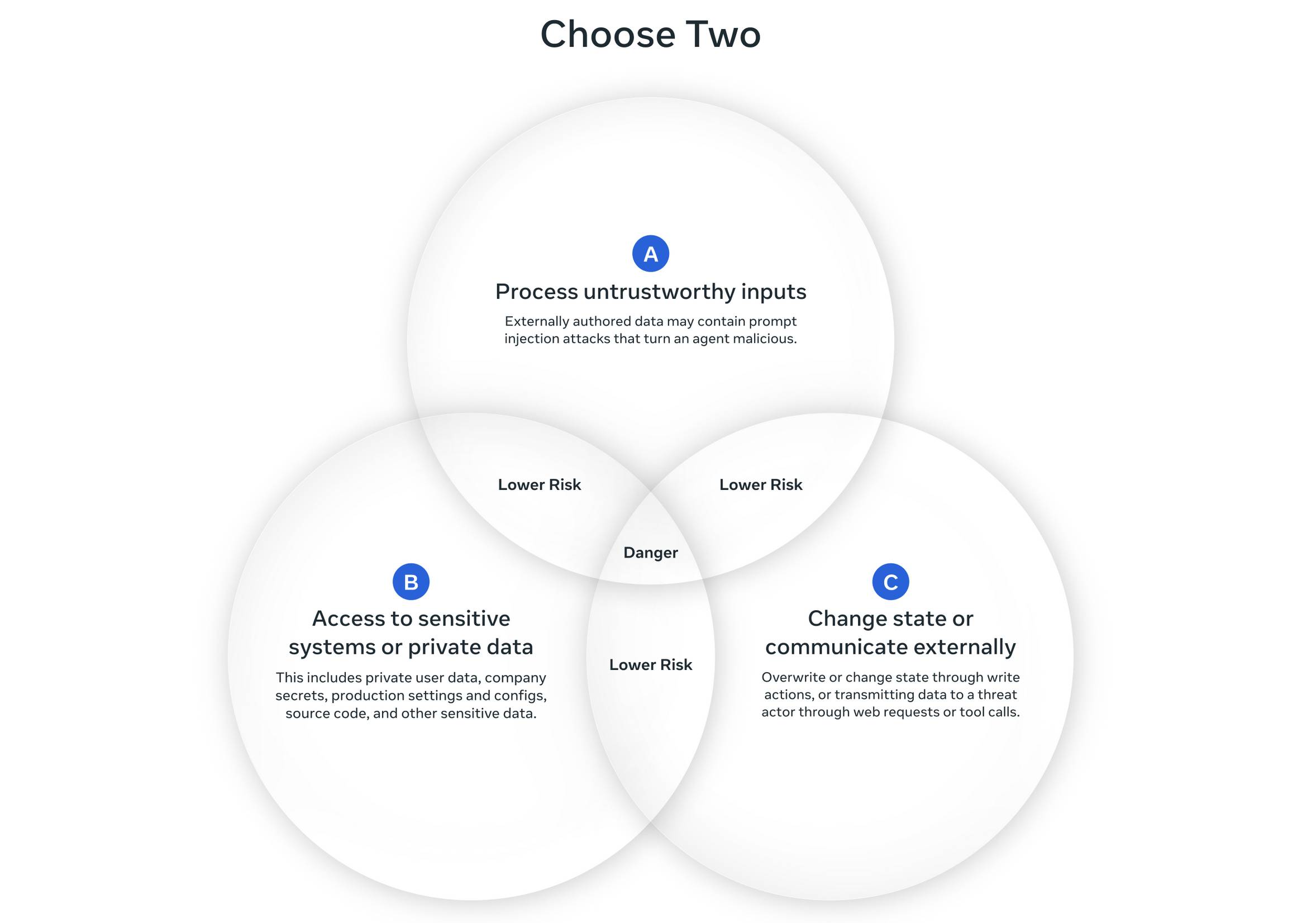 Image credit: Simon Willison
- Access to private data (emails, files, credentials)
- Exposure to untrusted content (web pages, incoming emails, external inputs)
- External communication abilities (sending emails, API calls outward)
You can manage any two of them together, but combining three of them creates an indefensible attack surface. I’ve chosen to limit the first two as much as I can, and not allow the third…mostly. More on that below.
What does GREMLIN actually do for me?
- Researches travel arrangements for me - and this is almost like a superpower. In addition to normal website access through Delta.com and Skyscanner, we hooked up a flights API from Amadeus.
- Books flights and train tickets - so far Delta (multiple bookings) and Ryanair have been no problem. The blast radius is limited with Delta because due to my Diamond status changes and cancellations are free. Ryanair was a bit more nerve wracking.
- Made several restaurant reservations by navigating their online booking systems. One needed a £15 deposit, so he told me to expect a security 2FA text from the bank (which helpfully confirmed the amount and vendor) and I gave him the security code YOU SHOULD NEVER GIVE TO ANYONE, just like I used to do with my human assistant.
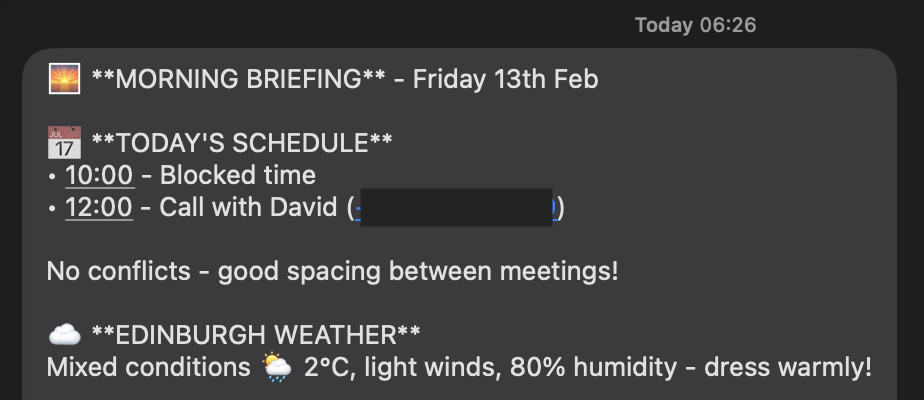
- Sends me a morning briefing outlining my schedule, the weather, any upcoming important birthdays (my trainer at the gym was disappointed to learn she didn’t make that list), any conflicts, if NC State, Hibernian or Sunderland are playing, and he flags any important emails.
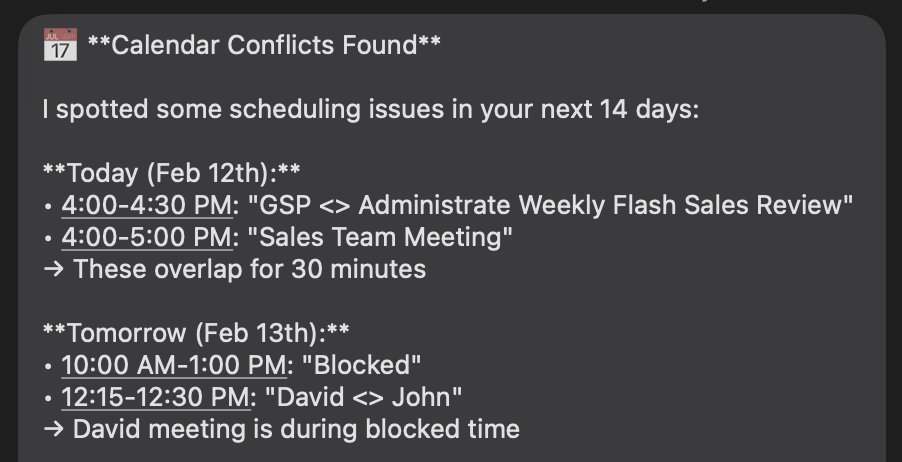
- Throughout the day he scans my calendar for any conflicts over the next two weeks.
- Plays music for me in the flat when asked, and can turn on or off lights, the heat, and anything else connected to Home Assistant.
- Searches my email really effectively (things like “When is that package going to arrive”)
- Researches products to buy on amazon, and provides me links and a pro/cons list
- Scans Edinburgh property listings with very detailed criteria that is not available on the standard filters and sometimes must be confirmed by analyzing images or details within the listing description
- Reminds me about appointments and calls and anything else I ask for help with
- Scans a list of bands that I sorted into tiers from my Apple Music account for any tour announcements or shows in a list of cities - higher tier bands I’ll travel further to see, for example!

That’s cool, but you know what’s really cool?
All of this has been really cool, but the inability to actually handle scheduling (due to not having access to sending emails, for, you know, security and sanity) meant I was still kind of stuck doing that stuff myself. Yes, he could draft responses and I could paste them in and blah blah blah but it’s still annoying and kind of defeats the purpose.
Yes, I could use calendly, but people kind of hate that, and I kind of hate it too. Stuff just showing up in my calendar with limited context, and having to really keep an eye on the slots I’d open up AND there’s no room for nuance. Half the time I’m annoyed at the timeslot chosen (or the length of the time chosen) for reasons that just don’t live within a calendar.
The Solution - a Custom Meeting API for GREMLIN
The main challenge is guarding against prompt injection attacks AND making sure we don’t open up a third circle. To prevent this, together with Claude, I built a small API driven app that GREMLIN could safely use. It only accepts a limited set of parameters and it controls the emails that can be sent, which are templated. Basically, the AI equivalent of bound parameters with SQL. Or so I hope.
At least for now, I’m also in the loop on each request - I get pinged on Slack to approve or deny the responses before they’re sent. I wrote more about the details behind this in a separate post.
Now GREMLIN can pickup requests for meetings, pick some dates and times, and fire off a response saying “here’s some times that are good for us” and all I have to do is approve the request via slack.
Each email is signed “GREMLIN, John’s AI Assistant” with a link to his page in case people are curious.
What’s Next?
Now that I’m no doubt annoying everyone subjected to my personal brand of AI slop, I think I’ll set my sights on giving GREMLIN a voice - sometimes you just need to call that restaurant for a booking! Or call HMRC and sit on hold, which I hate doing. Or any number of horrible call trees that must be navigated. Deploying GREMLIN on some of those tasks will be very satisfying.
What could possibly go wrong?
What Could Possibly Go Wrong?
- OpenClaw or Open Door? Prompt Injection Creates AI Backdoors - eSecurity Planet
- OpenClaw Bug Enables One-Click Remote Code Execution via Malicious Link - The Hacker News
- Personal AI Agents like OpenClaw Are a Security Nightmare - Cisco
- What Security Teams Need to Know About OpenClaw - CrowdStrike
- New OpenClaw AI Agent Found Unsafe for Use - Kaspersky
- 135K OpenClaw AI Agents Exposed to Internet - Bitdefender
- Your ClawdBot AI Assistant Has Shell Access and Is One Prompt Injection Away from Disaster - Snyk
- The ClawdBot Dumpster Fire: 72 Hours That Exposed Everything Wrong With AI Security - Acuvity
- Infostealers Added ClawdBot to Their Target Lists - VentureBeat
- Why OpenClaw Has Security Experts on Edge - Fortune