Building an AI Scheduling Assistant That Can't Go Rogue...I Hope.
In my last post I mentioned that the biggest gap in GREMLIN’s capabilities was scheduling - he could do all sorts of cool stuff, but couldn’t actually handle the one thing I wanted most: responding to the endless stream of “can we find a time to connect?” emails. These are super important, often time sensitive requests, but they’re a major pain to deal with, and I hate it.
The problem is, this kind of human vs. human scheduling requires sending emails. Sending emails means opening up a third circle in the Lethal Trifecta. And opening that third circle means we’re all one prompt injection away from disaster. Or at least, I would be. There’s nothing that inspired confidence quite like GREMLIN emailing passwords out to internet randoms. That would be, as we say in Scotland, “less than ideal.”
 Image credit: Generated by GREMLIN for GREMLIN
It was time to fire up Claude and build a system that lets GREMLIN schedule stuff using the normal rhythm people expect - check my calendar, propose times, send emails, receive responses, create calendar events, and send them out - all without giving him direct access to my email. Instead, we gave GREMLIN access to a tool that has access. And, at least for now, every outbound action requires explicit approval via Slack.
The Architecture
The system has three components:
- GREMLIN - who reads my emails and decides when meetings need to be scheduled. He has guidance on how to apply judgement in these situations, and he knows not to schedule overlapping or conflicting appointments. He also knows when I’m out of town or in a different timezone.
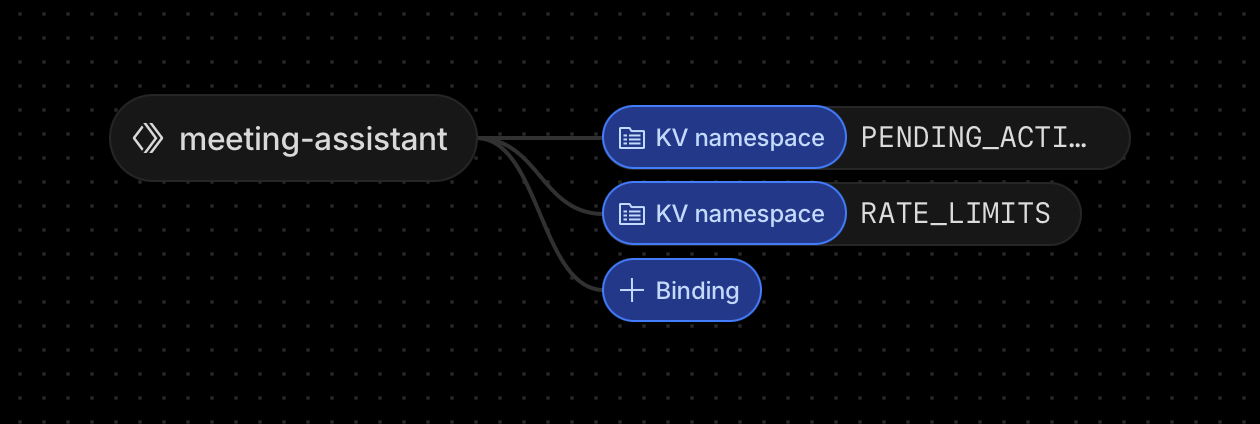
- An API accessible gateway running on a Cloudflare Worker, deployed at
meetings.peebs.org, that sits between GREMLIN and Google’s APIs - Slack - where I approve or reject every outbound action.
The flow is pretty straightforward:
GREMLIN reads an email asking for a meeting (or finds emails that I label in a specific folder):
  -> Calls the Google API to check my calendar availability
  -> Picks good times based on my schedule, and the guidance I've provided him
  -> Calls the meetings.peebs.org API to propose those times
  -> I get a Slack message with the details and [Approve] [Reject] buttons
  -> I tap Approve
  -> Email gets sent from my actual Gmail (threaded as a Reply All in case there are multiple participants, which there often are)
  -> Folks respond with the time that works for them, or different times, and we can often bounce back and forth here a few times (each interaction requiring my approval via slack before an email is sent)
  -> Once we've agreed on a slot, GREMLIN calls meetings.peebs.org one last time, and a calendar event gets created with a Zoom link
Why Cloudflare?
I wanted something with zero operational overhead. No servers to maintain or containers to manage. Cloudflare Workers provide zero cold starts (important for Slack’s 3-second response deadline), Key Value storage for pending approvals with auto-expiry, built-in crypto for JWT signing, and no npm runtime dependencies at all. They’re also free at my usage level.
The Security Model - aka, How I Sleep at Night
Crucially, the system is designed so that even if GREMLIN were completely compromised by a prompt injection attack, the blast radius is minimal.
GREMLIN can’t compose freeform emails, instead, he accesses meetings.peebs.org with limited parameters. The email templates are hardcoded, and he can only pass structured data - recipient name, email, meeting type, and proposed times. In nerd terms, it’s similar to bound parameters with SQL - the query is fixed, GREMLIN just fills in the blanks.
Right now, every outbound action requires my Slack approval before any email is sent or a calendar event is created. I see exactly what’s going to happen and explicitly approve it. There’s no bypass, even while testing. I may relax this in the future, but it’s not a huge burden - this automation has already removed 99% of the time required to process these kinds of requests.
The API has strict schema validation and rejects any request with unexpected fields or inputs that don’t pass validation. If GREMLIN tries to pass something the API doesn’t expect, he gets a 422 error. There’s also rate limiting - even if somehow approvals were bypassed, the system caps at 20 sends per day.
One really nice feature is GREMLIN can include a “context note” with his Slack request explaining his reasoning (e.g., “She mentioned she’s in Pacific time, so I picked afternoon slots”). This is shown to me in Slack but is never included in the outbound email. It’s a great (and very lightweight) way that helps me monitor, understand, and improve GREMLIN’s decision making.
There are also sensible bounds on parameters - meetings must be 15-120 minutes, max 5 proposed times, max 14-day lookahead so GREMLIN can’t propose a meeting 6 months from now. Meeting types are restricted to a fixed set of values (intro_call, follow_up, internal, external, demo, catch_up) so there’s no freeform categorization. And pending approvals expire after 72 hours, so if I miss a Slack notification the action just disappears rather than lingering around forever.
Reply All and Important Things Like Threading
A crucial piece to all of this is making sure email threading is preserved - when GREMLIN responds to an email, he passes the Gmail message ID to the Google API. The worker fetches the original headers, extracts all recipients (e.g. From, To, and CC), and automatically CCs everyone on the thread. The worker also adds proper In-Reply-To and References headers so the reply threads correctly in everyone’s inbox. Otherwise, this kind of traffic can really gum up inboxes and annoy people.
The important thing here is that GREMLIN never decides who gets CC’d - the worker just does what a normal “Reply All” would do. One less chance for an AI to hallucinate, and another safety mechanism.
What I See in Slack
When GREMLIN wants to propose meeting times, I get a DM like this:
New Meeting Proposal
To:     Jane Smith
Email:  [email protected]
Type:   intro_call

Proposed Times:
- Monday, 16 February at 10:00 – 10:30 GMT (05:00 - 05:30 EST)
- Tuesday, 17 February at 14:00 – 14:30 GMT (09:00 - 09:30 EST)
- Thursday, 19 February at 11:00 – 11:30 GMT (06:00 - 06:30 EST)

GREMLIN context: Referred by Sarah at ATD, interested in demo

[Approve]  [Reject]
Here’s a real one in action:
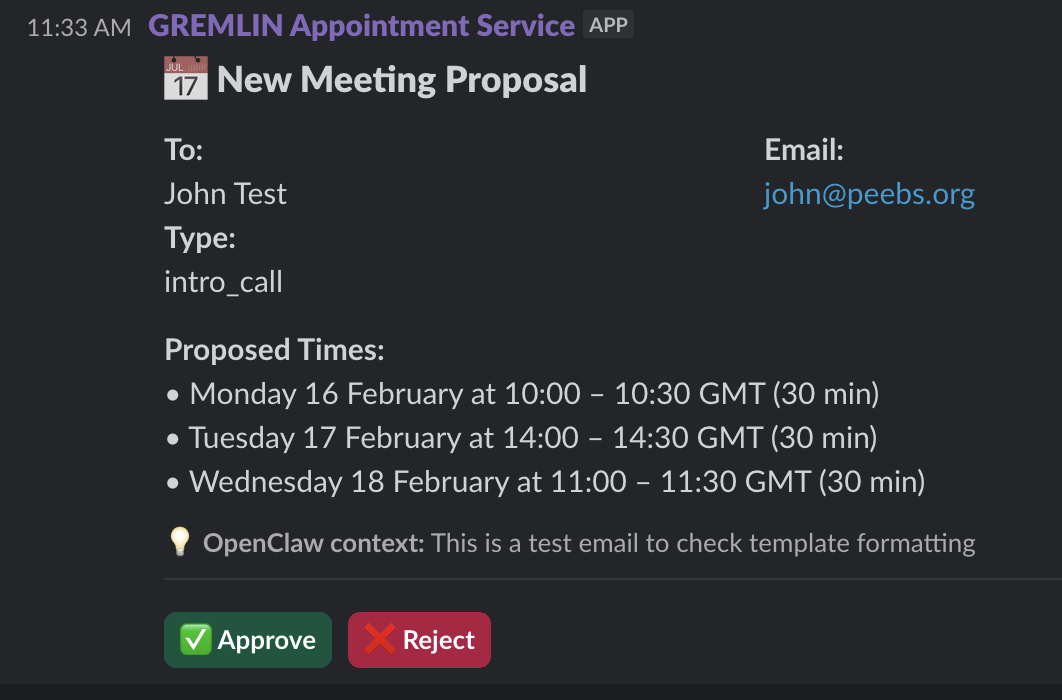
Times are shown in both UK and US Eastern time since a lot of my meetings are transatlantic. I see the recipients, proposed times, and why GREMLIN thinks this meeting should happen.
And here’s what the recipient actually sees in their inbox after I tap Approve:
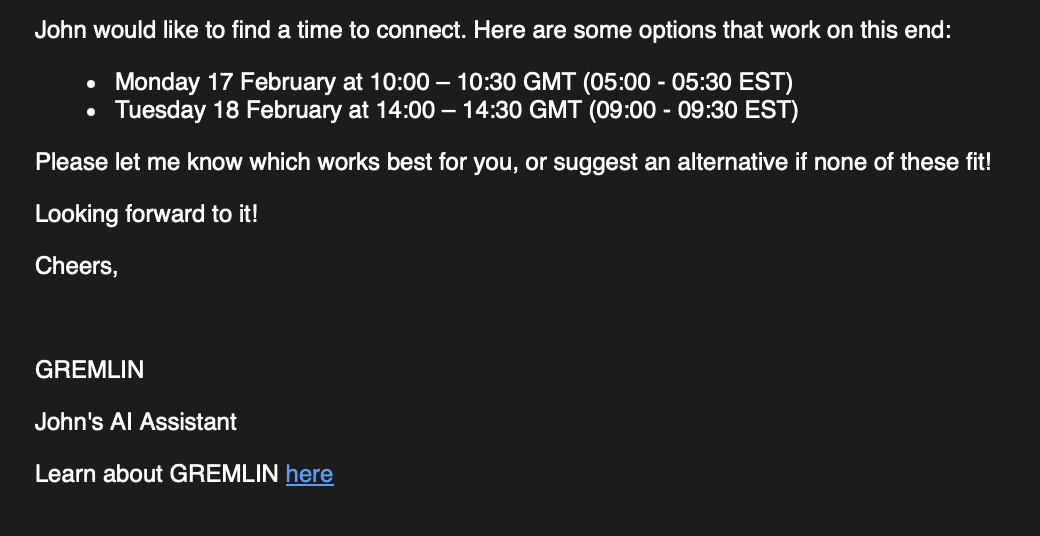
Building It with Claude Code
I built this during a single session with Claude Code. Together we scaffolded the worker, wrote the routing, auth, validation, API integration, and we iterated on the security model. I’d describe a concern and Claude would implement the constraint.
I also used Claude to run a complete security review of the codebase. So this thing is AIR TIGHT. Prolly.
What’s Next?
I’ll probably eventually update this so that GREMLIN uses a dedicated sender address so scheduling emails don’t clutter my inbox. I’ll also work on tweaking the decision making and implement a chase procedure to have him automatically flag when a proposed meeting gets no response after a few days.
GREMLIN handles 90% of the scheduling work, and importantly, the parts that I hate (and am bad at) - reading emails, checking calendars, picking times, drafting proposals. Instead, I just sit there and double check. For now.
This pattern of building high security tools that use “bound parameters” to help AI safely interact with the world is probably something I’ll eventually roll out across other task areas (scheduling travel and booking events). One thought would be - specific “booking browser” that can only access a whitelist of known travel sites, for example.
Until then, I’m thrilled GREMLIN can help me out on this necessary but very annoying part of my day!